Change rent terms, due dates or a move-in date
Apply new terms prospectively and correct old dates with an impact preview.
Tenancy → Manage tenancy
Before you beginHave the real agreement and a specific reason for the change.
Follow the steps
- 01
Open the tenancy and review current rent, deposit agreement, due day and the bills already issued.
- 02
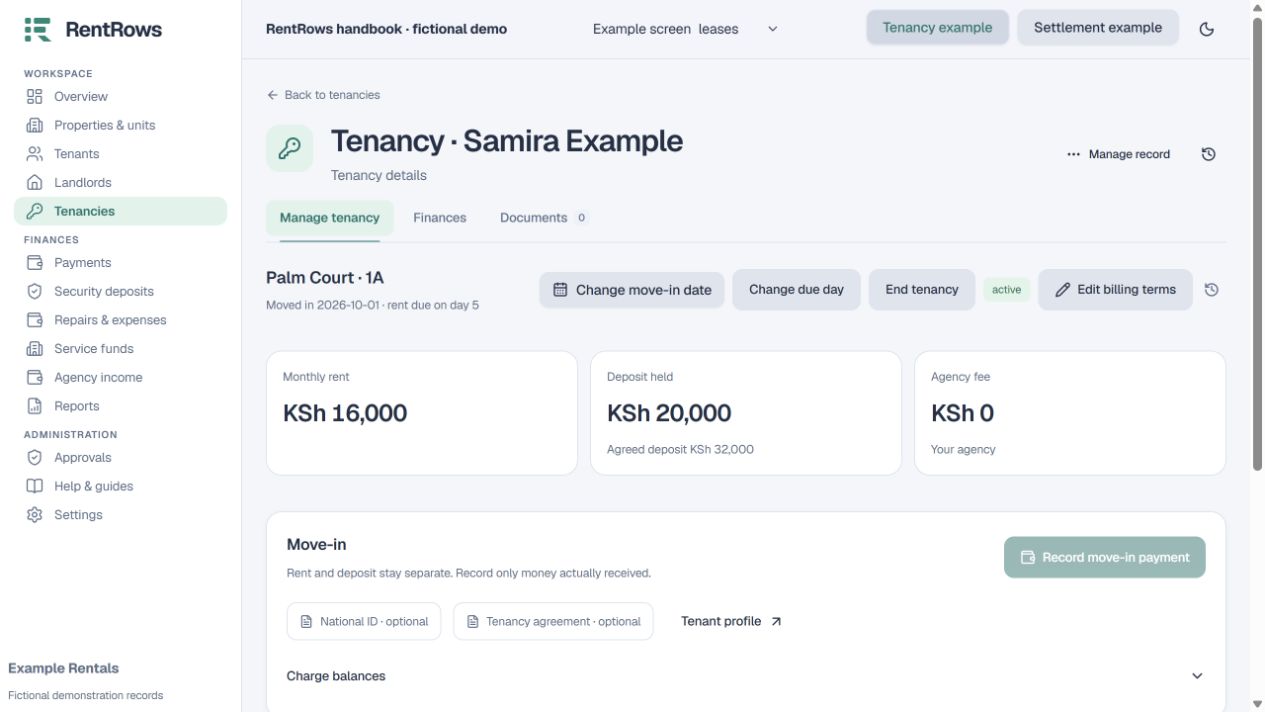
Use Edit billing terms for a genuine change to ongoing terms. Confirm when the new terms begin; earlier receipts and bills keep their saved history.
- 03
Use Change due day to update when rent is due. Read the effect on upcoming billing before saving.
- 04
For a wrong move-in date or first rent month, choose Change move-in date. Enter the actual date and review the proposed bill changes.
- 05
Check the impact on already paid rent and deposits. Keep legitimate receipts even when their received date was before occupation.
- 06
Give a reason, save and review the affected months. Use the billing update action only when current-month bills need synchronising.
Check the result
The tenancy shows the intended terms and its financial history still explains earlier periods.
Keep going
Still need help?
Tell support which screen you are on, what you expected and what happened. Include a bill or receipt number where useful. Never send passwords, payment credentials or email confirmation links.
Contact support →Open your workspace →