Create your account and choose a plan
Choose the right workspace, confirm your email, and start your trial.
Website → Start free trial
Before you beginUse an email address you can open. Each person needs their own sign-in.
Follow the steps
- 01
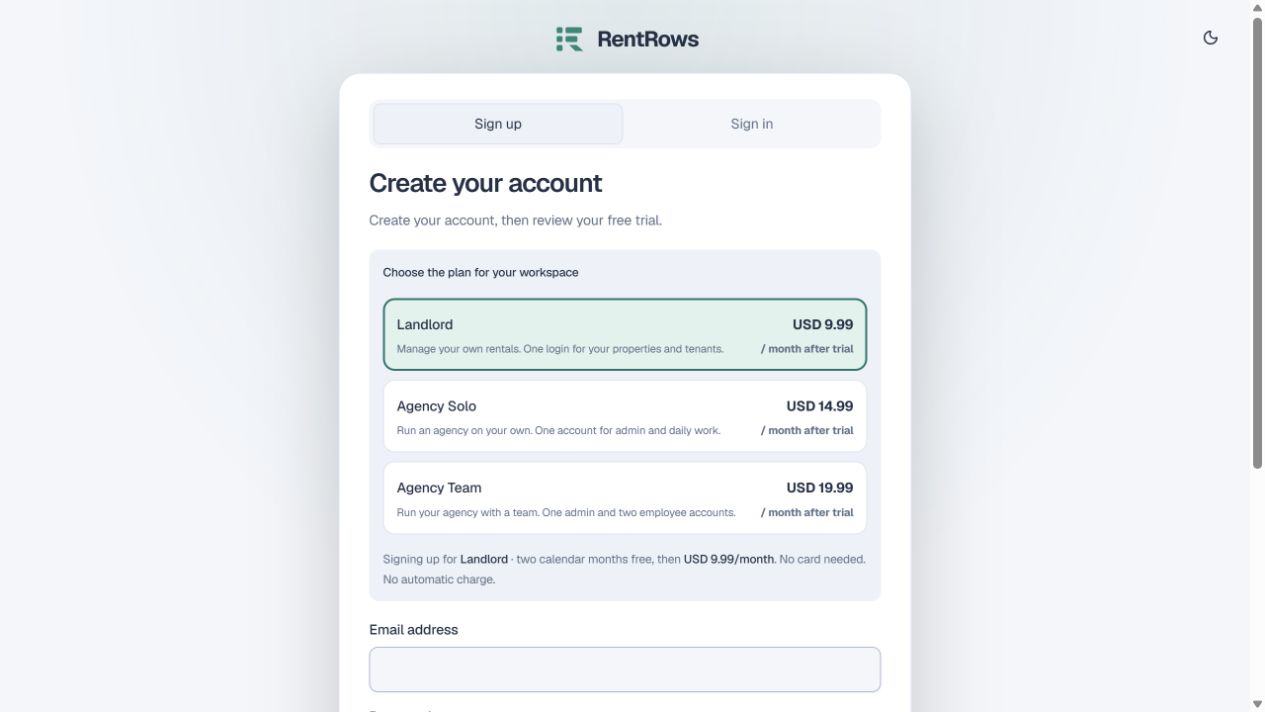
Choose Landlord if you manage your own rentals. Choose Agency Solo if you work alone for other owners, or Agency Team if your admin and employees need separate accounts.
- 02
Read the selected plan and monthly price above the registration form. Landlord is USD 9.99, Agency Solo USD 14.99, and Agency Team USD 19.99 per month after the trial.
- 03
Enter your name, email and password. Submit the form, then open the confirmation email. Check Spam if it does not arrive. Use the newest confirmation link.
- 04
Return to RentRows, sign in and review the trial screen. Confirm the plan before accepting the two-calendar-month trial.
- 05
Complete your workspace details. The trial needs no card and does not start an automatic charge.
Check the result
You have a private workspace under the plan you chose. Your trial end date appears in Billing.
Keep going
Still need help?
Tell support which screen you are on, what you expected and what happened. Include a bill or receipt number where useful. Never send passwords, payment credentials or email confirmation links.
Contact support →Open your workspace →