Import properties, units and tenants
Fill a simple template, review it and add records safely.
Settings → Imports & downloads → Import data → Units & tenants
Before you beginStart with a small copy of your spreadsheet. Choose the template for your workspace category.
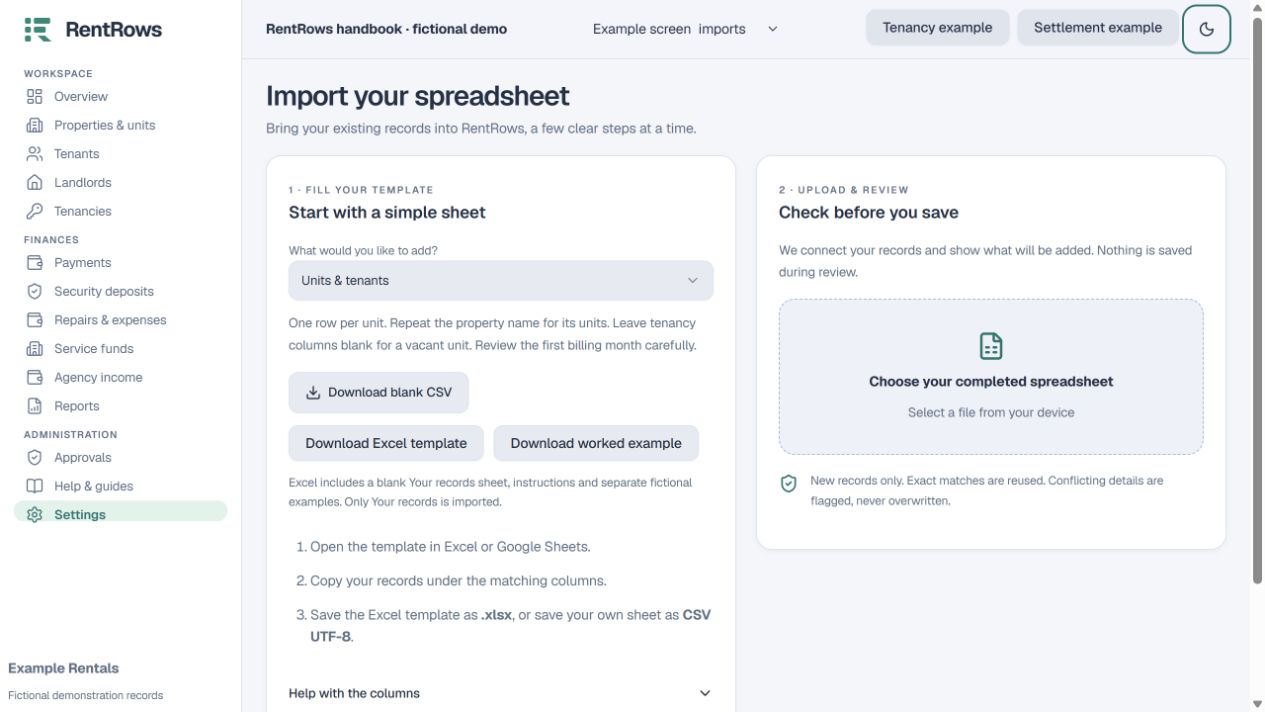
Follow the steps
- 01
Choose Download Excel template for a workbook with instructions, an empty Your records sheet and a separate Worked examples sheet. Fill only Your records with your own data. A blank CSV and separate CSV example are available too.
- 02
Use one row per unit. Repeat the same property name for its units. Leave the Tenant and tenancy columns blank for a vacant unit.
- 03
Enter monthly rent and agreed deposit as numbers without currency symbols or thousands separators. Deposit required means the agreement, not money already paid.
- 04
Enter dates as YYYY-MM-DD or DD/MM/YYYY. Rent billed from must be the first day of the first month you want charged; older move-in dates can otherwise create many historical bills.
- 05
Save the template as .xlsx, or save your own sheet as CSV UTF-8. Upload it and choose Review my file. Read warnings and row errors. Nothing is saved during review.
- 06
When the preview is correct, select Confirm import. Add actual past payments next, then review occupied units and balances.
Check the result
New records are added; matching records are reused and conflicting details are flagged.
Keep going
Still need help?
Tell support which screen you are on, what you expected and what happened. Include a bill or receipt number where useful. Never send passwords, payment credentials or email confirmation links.
Contact support →Open your workspace →