Manage owner accounts and payouts
Explain gross rent, fees, costs and amounts payable to each landlord.
Landlords → Open landlord account
Before you beginUse an agency workspace. Check rent receipts, fee policies and expenses first.
Follow the steps
- 01
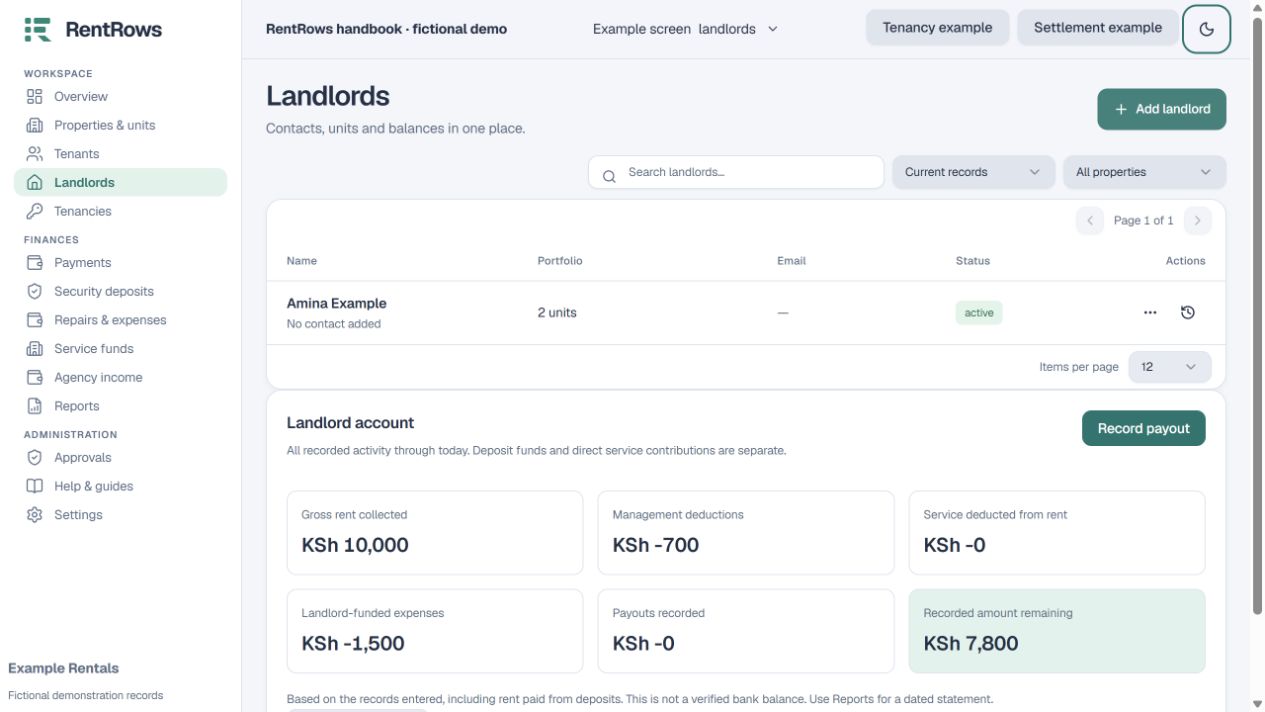
Open the owner account and review gross rent received, management/service deductions, landlord-funded costs and earlier payouts.
- 02
Check fees against the saved policy that applied to each period. Percentage fees use the agreed base; expenses are tracked separately.
- 03
Review the remaining recorded balance. Compare it with your bank or cash records before paying.
- 04
Make the actual transfer, then record the payout with amount, date and genuine reference.
- 05
Use Reports for a dated landlord statement. Add a cash collection acknowledgment only if needed.
Check the result
The owner can see a clear statement from rent collected through to payouts.
Keep going
Still need help?
Tell support which screen you are on, what you expected and what happened. Include a bill or receipt number where useful. Never send passwords, payment credentials or email confirmation links.
Contact support →Open your workspace →