Record deposits and understand the held balance
Separate the agreement from money received, used and returned.
Deposits → Open tenancy
Before you beginCheck the deposit agreement and genuine receipts.
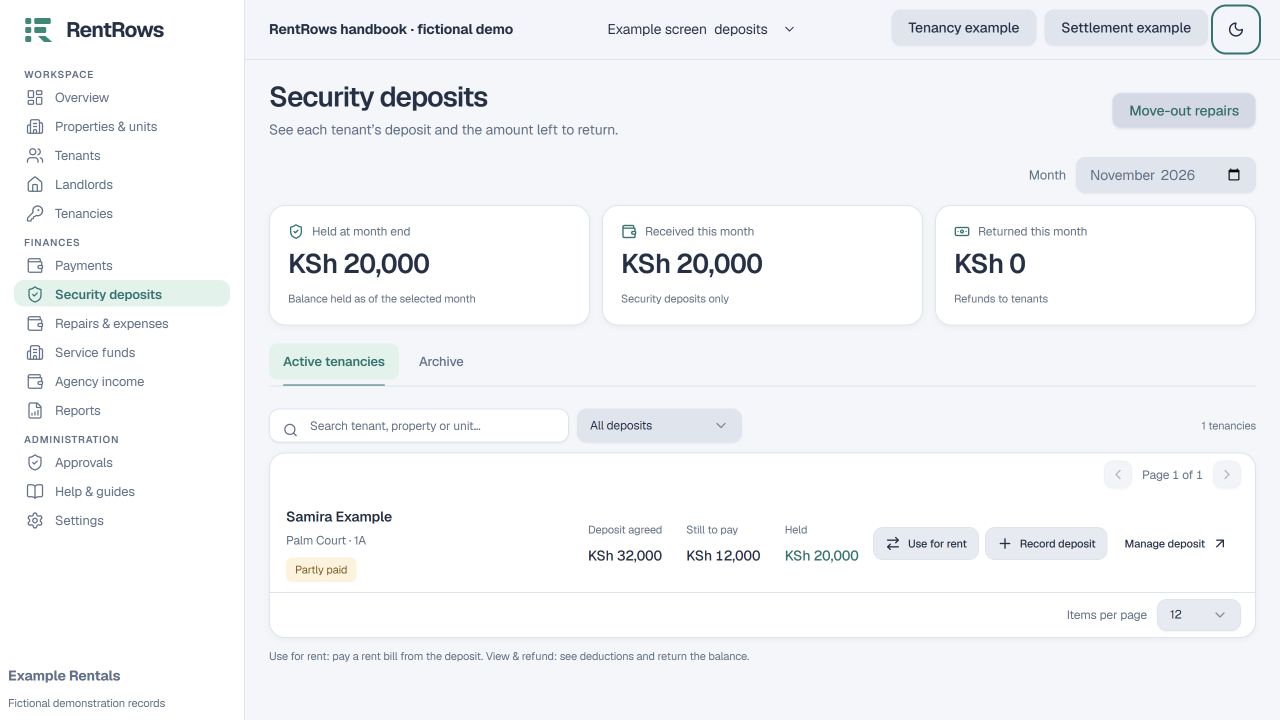
Follow the steps
- 01
Review Agreed deposit: the amount required by the tenancy. Change the agreement only when the real terms changed.
- 02
Record actual deposit money received, including later top-ups. Do not record the same receipt twice.
- 03
Read Held deposit as the money available after rent use, repairs and refunds. Lifetime receipts can be larger than the agreed amount.
- 04
If a receipt is missing, investigate the original records. An unpaid requirement does not prove the tenant paid nothing.
- 05
Use the deposit actions to apply agreed funds or record an actual refund. Review each resulting movement.
Check the result
The deposit screen shows the requirement, actual held funds and dated movements separately.
Keep going
Still need help?
Tell support which screen you are on, what you expected and what happened. Include a bill or receipt number where useful. Never send passwords, payment credentials or email confirmation links.
Contact support →Open your workspace →